How Can I Test a Power Supply?
You can test a power supply to check if it works properly. This process helps you find problems before they damage your computer. Testing saves time and money on unnecessary part replacements.
You need simple tools and careful steps for safe testing. Correct testing confirms the power supply delivers stable power.
Why Testing Your Power Supply Matters
A bad power supply causes random shutdowns and system instability. It may damage other expensive components inside the computer case. Regular testing catches problems early and prevents bigger failures.
This step ensures your computer runs safely for many years. Testing gives peace of mind during important work and gaming.
Tools Needed for Basic Testing
You need a power supply tester tool for quick checks. A digital multimeter helps measure voltage on different rails. Paperclip method works for basic on off testing of the unit.
Safety gloves and proper lighting make the testing process safer. These simple tools give reliable results for most users.
Step by Step Paperclip Test
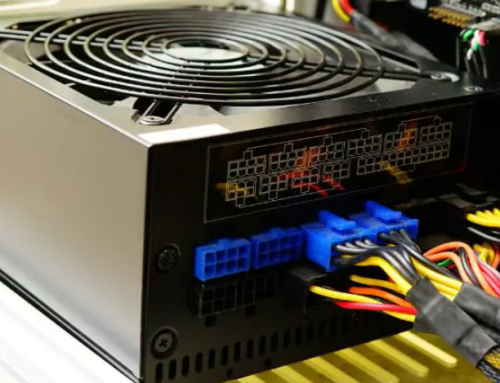
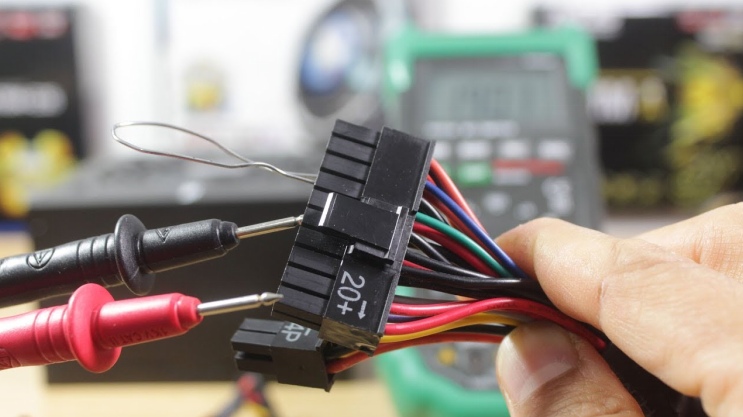
Unplug the computer from the wall outlet before you start. Find the twenty four pin connector on the power supply. Bend a paperclip to short the green wire and any black wire.
Plug the power supply back into the wall outlet carefully. The fan should spin if the unit turns on successfully.
Using a Power Supply Tester Tool
Connect the twenty four pin connector to the tester device. The tool shows voltage readings on different rails in numbers. Good readings stay close to twelve volts five volts and three point three volts.
Red or yellow lights mean problems with the power supply. This method gives accurate results without opening the computer.
Checking Voltage with a Multimeter
Set the multimeter to direct current voltage measurement range. Connect the black probe to any black wire on the connector. Touch the red probe to the yellow wire for twelve volt reading.
Compare the numbers with the expected voltage levels carefully. Repeat for other wires to check five volt and three point three volt rails.
Signs of a Failing Power Supply
The fan makes loud or unusual noises during normal operation. The computer shuts down suddenly without any warning message. Voltage readings fluctuate more than normal on the tester.
Burning smell or visible damage appears on the unit. These signs mean the power supply needs immediate replacement.
Real Examples of Power Supply Units
Different computers need specific power supplies that match their exact requirements. Common replacement options by system include:
- Certain HP Pavilion models work with a 300W ATX replacement unit
- Dell OptiPlex desktops often require the 240W unit for Dell OptiPlex 390 790 990
- Higher performance Dell G5 systems may need a 500W PSU for Dell G5 models
You can find matching units for many other computer brands and models easily.
Safety Precautions During Testing
Unplug the computer from the wall before you touch any wires. Wear safety gloves to protect your hands from electrical shock. Work in a well lit area with good visibility around you.
Never open the power supply case unless you have experience. Follow all safety steps to avoid injury during testing.
When to Replace the Power Supply
Replace the unit if test results show low or unstable readings. Change it after four to five years of normal daily use. Buy a new unit with correct wattage and form factor.
Install the new power supply carefully inside the computer case. This step restores stable power to all system components.
Tips for Better Power Supply Testing
Test the power supply outside the case for accurate results. Compare readings with the specifications printed on the label. Repeat the test several times for consistent voltage numbers.
Document all readings to track changes over several months. Professional testing gives the most reliable diagnosis of failure.
Benefits of Regular Power Supply Testing
Regular testing catches problems before complete failure occurs. It prevents unexpected data loss and expensive component damage. You save money by replacing the unit at the right time.
Testing improves overall computer performance and reliability. This practice extends the useful life of your entire system.
Final Advice on Power Supply Testing
Test your power supply when you notice any warning signs. Use simple tools and follow safety steps for best results. Replace the unit if tests show clear problems or low readings.
A good power supply keeps your computer running smoothly. Regular checks protect your investment for many years.
If you need a reliable replacement power supply check the options at 365PowerSupply.com.